ALTERNATIVES
Trello Alternatives for Kanban Boards and Team Work
Compare Trello alternatives for kanban Boards and Team Work. Check cards, rules and migration.
On this page
The short version
| Option | Choose it for | Check first |
|---|---|---|
| OpenTodo · AI-built project | Boards, sections, assignments and shared projects | Self-hosting and no complete automation migration claim |
| Vikunja · established software | Kanban alongside list, Gantt and table views | Deployment, sharing and importer details |
| TickTick · established software | Hosted task lists and Kanban for personal or shared work | Required views and capacities by plan |
An AI-built option
1 projectEstablished options to compare

Vikunja
An open-source task system with list, Kanban, Gantt and table views, plus sharing and assignments.
Choose between self-hosted operation and a separate managed cloud offer. Importers still need a representative migration check.
Visit official site
TickTick
A hosted task app with date entry, repeating tasks, reminders, lists and Kanban views.
Compare your required calendar views and capacities against the current free and Premium tiers. No self-hosted edition was established here.
Visit official site OpenTodo
Move a board with its working rules
01Personal planning and a team process need different controls.
02A column move may trigger rules that must be replaced.
03Check attachments, assignments and dates after import.
Try one workflow before switching
Move one board with a checklist, a due date and a column rule. Move a card through the workflow and check which actions and notifications still happen.
A personal board or a team process?
For personal use, a few columns and clear dates may cover the job. A team board adds assignments, membership and control over who can change work. OpenTodo documents sections and boards with sharing; the operational responsibility stays with whoever runs the server.
Map the rules behind each column
Before replacing a Trello board, list the rules triggered by moving a card, due-date changes, notifications and Power-Ups. The three options here cover task views; that does not establish equivalent automation or app integrations. Keep a manual version of a critical rule until its replacement is checked.
Inspect the imported board, not just the import message
Use a sample containing an attachment, an assigned task, a due date and a checklist. After import, inspect both a board view and the underlying task. OpenTodo and Vikunja publish import documentation, but this review did not execute a migration or validate a Trello workspace.
How to use this comparison
Run the same small workflow in your shortlisted products: keep the input, output and required integration the same. The table records documented scope; it does not report a side-by-side product test.
A few more details
Is an open-source Trello alternative automatically easier to run?
Software licensing and operation are separate decisions. OpenTodo requires an operated server; Vikunja offers self-hosted or managed deployment. Consider the people responsible for updates and recovery.
Are all of these apps AI-built?
Only entries with an original maker record carry that attribution. Established products are listed separately and are not assigned an AI-build label.
Sources & maker notes
The AI-build attribution applies only to products with a linked maker record. Other options use the publisher’s current product documentation; prices and plans should be checked at the source.
- OpenTodo official repository and build process
- OpenTodo — original maker introduction
- OpenTodo product site
- OpenTodo sections and boards
- OpenTodo migration entry
- Self-host OpenTodo
- OpenTodo maker, demo and site attribution
- Vikunja official documentation
- TickTick official documentation
- Trello official product
Related guides & projects
View allLinear Alternatives for Issue Tracking and Team Backlogs
Compare Linear alternatives for issue Tracking and Team Backlogs. Check issue relations, triage and workflow state.
Read moreSoftware Alternatives by Product
Start with a product you use and compare replacement workflows, supported tasks and what you would need to migrate.
Read moreProductivity App Examples
Find a practical home for notes, tasks and shared project knowledge.
Read more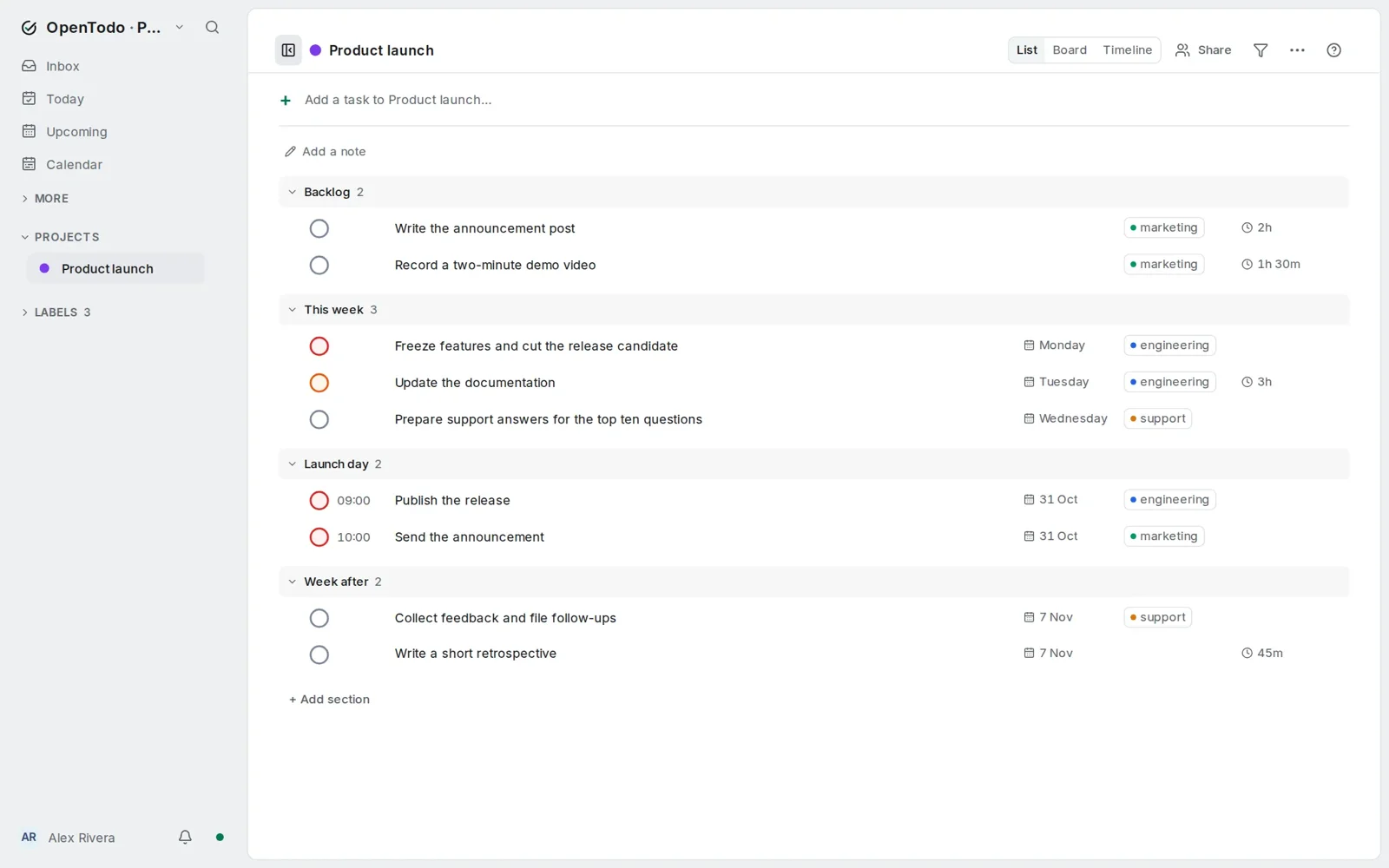 From the maker
OpenTodo
A self-hosted task manager with lists and boards, scheduling, shared projects and documented imports from existing task apps.
Claude CodeOpenTodo vs Trello
The shared task is a project board with columns and assignments. Trello automation, Power-Ups, attachment behavior and workspace permissions need separate migration checks.
Read moreHow vibeforthat Reviews Sources
Understand the difference between a discovery lead, a maker build record and an independently tested product.
Read more