
ALTERNATIVES
Descript alternatives
Descript alternatives need to distinguish editing spoken content by text from editing a timeline. Riverside is relevant to recording and text-led editing, VEED to browser video and captions, and Audacity to audio-track work. Compare transcript correction, speakers and editable output separately from trimming a clip.
On this page
The short version
| Option | Documented focus | Check before moving |
|---|---|---|
| MasterSelects · AI-assisted project | Arrange clips, nested compositions, keyframes, masks and audio on editing workspaces. | Desktop-browser timeline editing; transcript editing and Descript project import are not established. |
| Riverside | Recording and text-led editing for spoken content | Evaluate timeline or transcript editing. |
| VEED | Browser-based video editing and captions | Evaluate captions, audio and review. |
| Audacity | Audio recording, track editing and mixing | Evaluate project files and output settings. |
An AI-built option
1 projectEstablished options to compare

Riverside
Recording and text-led editing for spoken content
Evaluate timeline or transcript editing.
Visit official site
VEED
Browser-based video editing and captions
Evaluate captions, audio and review.
Visit official site
Audacity
Audio recording, track editing and mixing
Evaluate project files and output settings.
Visit official siteDescript/Riverside01Edit one spoken clip, correct its captions and reopen the project; compare what remains editable after export.
02A rendered clip is different from an editable project. Keep original media and check caption correction, browser or device limits and the output needed by the person receiving the work.
Choose the part of Descript you need to replace
Descript alternatives need to distinguish editing spoken content by text from editing a timeline. Riverside is relevant to recording and text-led editing, VEED to browser video and captions, and Audacity to audio-track work. Compare transcript correction, speakers and editable output separately from trimming a clip.
Where MasterSelects fits
Desktop-browser timeline editing; transcript editing and Descript project import are not established.
- The current README recommends Chrome or Edge on desktop; browser, GPU and media-codec support affect the workflow.
- Hosted AI and media generation use external services and may require credits; this is separate from local editing.
Keep these requirements in the shortlist
- Timeline or transcript editing
- Captions, audio and review
- Project files and output settings
Try one representative workflow
Edit one spoken clip, correct its captions and reopen the project; compare what remains editable after export.
What to preserve during the move
A rendered clip is different from an editable project. Keep original media and check caption correction, browser or device limits and the output needed by the person receiving the work.
Compare the working setup, not just the starting plan
Use the publisher’s current plan and deployment documentation for a real quote. Count the people, usage and required integrations in this workflow, then include migration and ongoing ownership. The options are organized by task, not claimed to be the cheapest.
How to use this comparison
Run the same small workflow in your shortlisted products: keep the input, output and required integration the same. The table records documented scope; it does not report a side-by-side product test.
A few more details
How should I evaluate a Descript alternative?
Edit one spoken clip, correct its captions and reopen the project; compare what remains editable after export. A rendered clip is different from an editable project. Keep original media and check caption correction, browser or device limits and the output needed by the person receiving the work.
Are all of these apps AI-built?
Only entries with an original maker record carry that attribution. Established products are listed separately and are not assigned an AI-build label.
Sources & maker notes
The AI-build attribution applies only to products with a linked maker record. Other options use the publisher’s current product documentation; prices and plans should be checked at the source.
- MasterSelects — original maker development account
- MasterSelects — current official repository
- MasterSelects — project storage documentation
- Riverside — official product and workflow documentation
- VEED — official product and workflow documentation
- Audacity — official product and workflow documentation
- Descript — official product and workflow documentation
Related guides & projects
View allSoftware Alternatives by Product
Start with a product you use and compare replacement workflows, supported tasks and what you would need to migrate.
Read moreDesign and Content App Examples
Choose a focused tool for visual assets, recording, editing or publishing.
Read more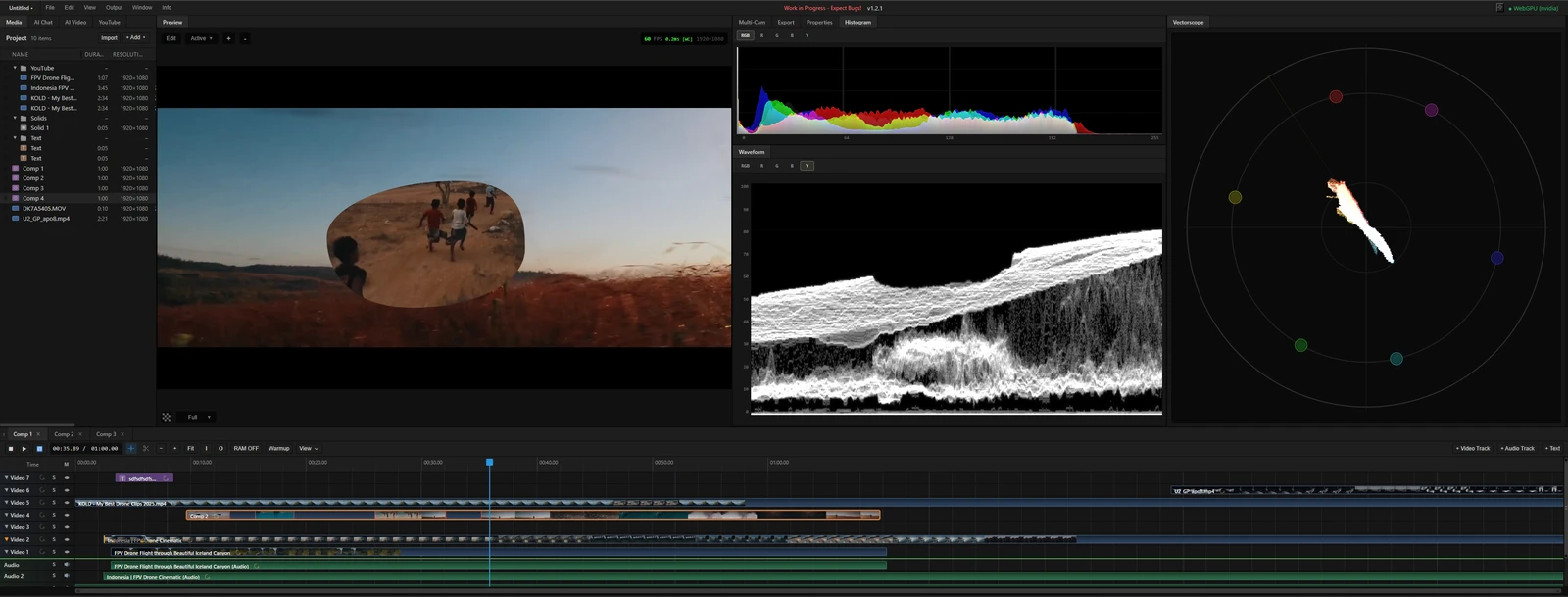 From the maker

MasterSelects
A desktop-browser media editor with a multitrack timeline, node effects and local WebGPU rendering.
ClaudeMasterSelects vs Descript
Desktop-browser timeline editing; transcript editing and Descript project import are not established.
Read moreHow vibeforthat Reviews Sources
Understand the difference between a discovery lead, a maker build record and an independently tested product.
Read moreSubmit Your App, AI Tool or Vibe-Coded Project
Submit an app, AI tool or development resource with a clear product link, useful description and source for any build claim.
Read more