ALTERNATIVES
Later Alternatives for Visual Social Scheduling
Compare Later alternatives for visual Social Scheduling. Check calendar views, reusable media and reporting.
On this page
The short version
| Option | Useful starting task | Check separately |
|---|---|---|
| BrightBean Studio · AI-assisted project | Visual calendar, media variants and approvals | No Later grid or Link in Bio migration verified |
| Buffer · established software | A managed queue for chosen channels | Required visual planning and team features |
| Metricool · established software | Planning, reports and Smartlinks | Connected data, report scope and current plan |
An AI-built option
1 projectEstablished options to compare

Buffer
A hosted publishing queue with planning and channel-based management.
Compare the channels and team steps you actually need, then check the current plan.
Visit official site
Metricool
Combines social planning with channel analytics, reporting and Smartlinks.
Consider it when reporting or a link-in-bio workflow is part of the requirement.
Visit official site BrightBean Studio/
01A publishing calendar is different from a profile grid.
02Your bio destination needs its own link check.
03Future posts and historical reports move separately.
Try one workflow before switching
Take one week's worth of media and build a short calendar. Check how an editor can find the original asset, change the date and get the published results into your next report.
A calendar and a profile grid answer different questions
A calendar tells you when content will be published. A profile grid helps you arrange how a collection of posts will look. Later’s visual planning is a recurring topic in current comparison results. BrightBean Studio has a documented calendar, but this review did not verify a matching Instagram-grid workflow. Write down which view changes your publishing decisions before choosing a replacement.
Move usable media, not only a posting date
For one campaign, keep the original images, channel-specific crops, captions and the person who approves them. BrightBean Studio documents a media library and per-platform composition; its publisher screenshot shows the composer. A calendar transfer that loses the approved crop or caption still creates rework. No direct import of Later’s media organization was established here.
Treat the link-in-bio destination as its own page
A scheduling tool can publish a post without replacing the page behind your profile link. If that page matters, list its destinations and how you measure clicks. Metricool documents Smartlinks alongside planning and reporting. For a small standalone bio page, the link-page products linked below are another route. Do not remove the existing destination until the new links have been checked.
Decide what you need to carry into the next report
Separate future post scheduling from historical reporting and creator-campaign work. Metricool documents channel analytics and reports; BrightBean Studio documents native-platform metrics with platform-dependent coverage. Neither statement proves that old Later reports or influencer records will migrate. Compare the metrics and date ranges you actually report, then test one account before changing the whole workflow.
How to use this comparison
Run the same small workflow in your shortlisted products: keep the input, output and required integration the same. The table records documented scope; it does not report a side-by-side product test.
A few more details
Does a social calendar replace every part of Later?
Check profile planning, media organization, link destinations, analytics and creator work separately. The calendar establishes only the scheduling part.
Are all of these apps AI-built?
Only entries with an original maker record carry that attribution. Established products are listed separately and are not assigned an AI-build label.
Sources & maker notes
The AI-build attribution applies only to products with a linked maker record. Other options use the publisher’s current product documentation; prices and plans should be checked at the source.
Related guides & projects
View allBuffer Alternatives for Social Scheduling and Approval
Compare Buffer alternatives for social Scheduling and Approval. Check channel support, approval and publishing.
Read moreSoftware Alternatives by Product
Start with a product you use and compare replacement workflows, supported tasks and what you would need to migrate.
Read moreMarketing and Social App Examples
Choose the step in your publishing or email workflow that needs a better tool.
Read more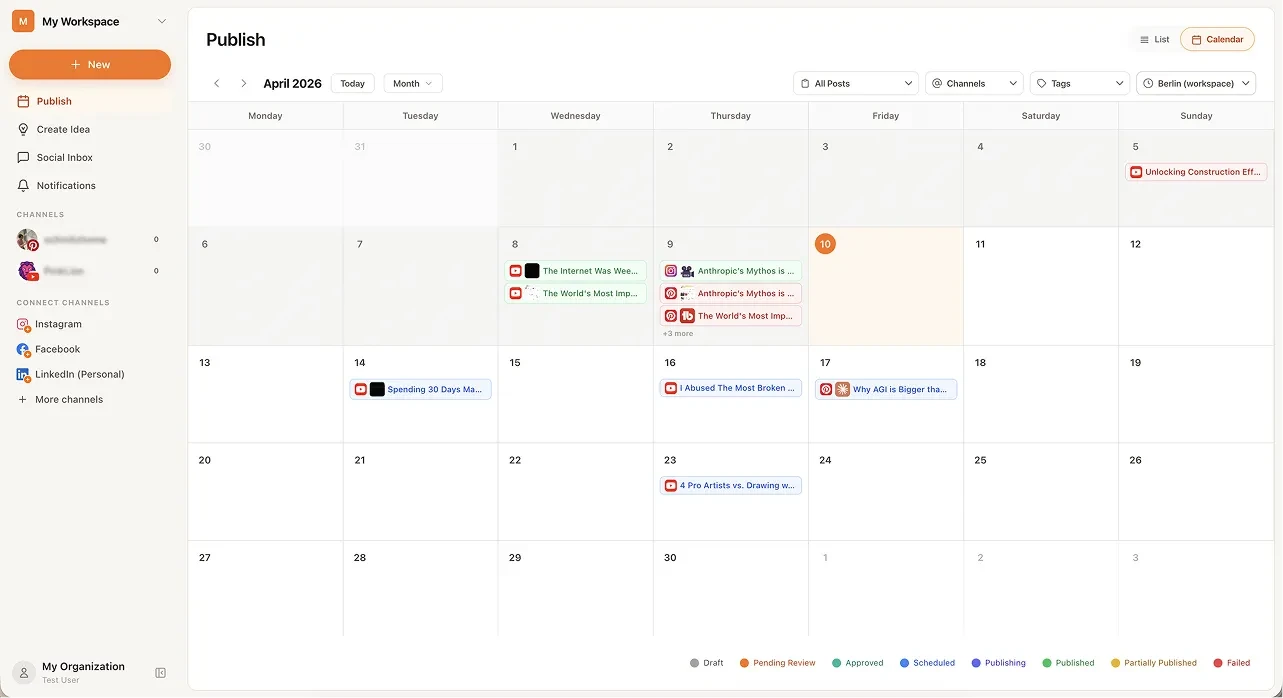 From the maker
BrightBean Studio
A self-hostable social publishing workspace with a calendar, platform-specific drafts and approval steps.
Claude Code · CodexBrightBean Studio vs Later
Separate the calendar, profile preview, media library and link-in-bio page before replacing Later. Compare BrightBean Studio for an owned publishing workflow, Buffer for a managed queue and Metricool for planning with reporting.
Read moreHow vibeforthat Reviews Sources
Understand the difference between a discovery lead, a maker build record and an independently tested product.
Read more