
ALTERNATIVES
Buffer Alternatives for Social Scheduling and Approval
Compare Buffer alternatives for social Scheduling and Approval. Check channel support, approval and publishing.
On this page
The short version
| Option | Useful starting task | Check separately |
|---|---|---|
| BrightBean Studio · AI-assisted project | Calendar, drafts and approval stages | Platform credentials and deployment operations |
| Metricool · established software | Planning with analytics and reports | Connected networks and report requirements |
| Publer · established software | Managed social scheduling | Supported channels, team access and plan terms |
An AI-built option
1 projectEstablished options to compare

Metricool
Combines social planning with channel analytics, reporting and Smartlinks.
Consider it when reporting or a link-in-bio workflow is part of the requirement.
Visit official site
Publer
A hosted social media workspace for scheduling, collaboration and performance analysis.
Useful when a managed service matters more than operating your own deployment.
Visit official site BrightBean StudioBuffer
Follow one small deliverable through the workflow
01Check each required network action in the support matrix.
02Keep draft creation and approval as separate decisions.
03Self-hosting includes worker and credential setup.
Try one workflow before switching
Prepare one post for two channels with different captions. Follow it from draft through approval to the publishing queue and check who can fix a rejected draft.
Start with one post and its destinations
Write down the actual account types, not just network names: an Instagram business profile, a LinkedIn company page and a YouTube channel can have different publishing paths. BrightBean Studio publishes a matrix separating publishing, comments, messages and insights. Use it to check your required actions. A long list of supported networks alone does not answer that question.
Keep the variations beside the draft
A single announcement may need a shorter caption, a different crop and a different link for each destination. BrightBean Studio documents per-platform caption and media overrides; its official composer screenshot shows that part of the workflow. Compare a real draft in each candidate before assuming that one scheduled post produces the right version everywhere.
Decide where a draft becomes publishable
Record who writes, who checks the media and who may approve a post. BrightBean Studio documents internal and client approval stages, while the managed alternatives have their own team and plan rules. Keep this separate from an AI agent’s ability to create or schedule a draft. We did not connect social accounts or send an approval request in this review.
Budget for the service you will run
For self-hosting, include the database, background worker, upgrades and platform developer applications in the operating plan. BrightBean Studio’s README documents credentials and network-specific reviews; running the server does not create those permissions. If you prefer a managed workspace, compare Publer’s current terms against the number of accounts and people you need. No direct Buffer queue or analytics importer was verified.
How to use this comparison
Run the same small workflow in your shortlisted products: keep the input, output and required integration the same. The table records documented scope; it does not report a side-by-side product test.
A few more details
Is a self-hosted scheduler automatically cheaper?
Compare the software, hosting, operations and platform requirements together. An open-source license alone does not account for running the publishing service.
Are all of these apps AI-built?
Only entries with an original maker record carry that attribution. Established products are listed separately and are not assigned an AI-build label.
Sources & maker notes
The AI-build attribution applies only to products with a linked maker record. Other options use the publisher’s current product documentation; prices and plans should be checked at the source.
Related guides & projects
View allLater Alternatives for Visual Social Scheduling
Compare Later alternatives for visual Social Scheduling. Check calendar views, reusable media and reporting.
Read moreSoftware Alternatives by Product
Start with a product you use and compare replacement workflows, supported tasks and what you would need to migrate.
Read moreMarketing and Social App Examples
Choose the step in your publishing or email workflow that needs a better tool.
Read more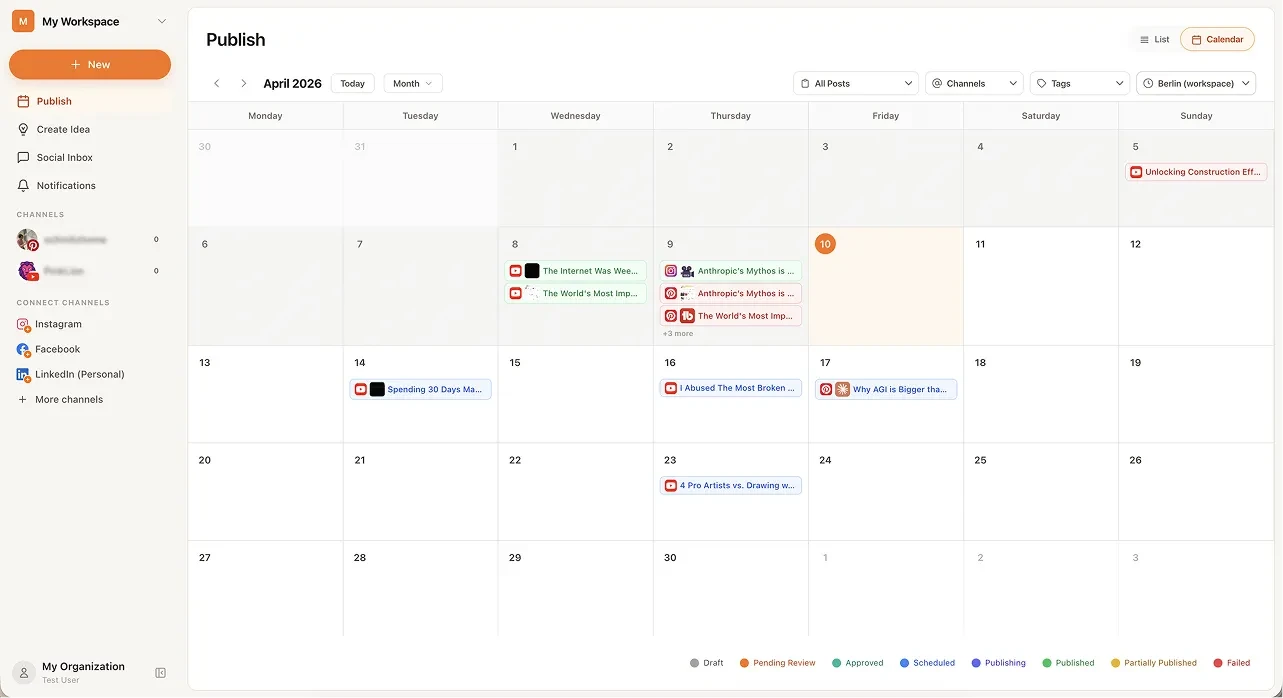 From the maker
BrightBean Studio
A self-hostable social publishing workspace with a calendar, platform-specific drafts and approval steps.
Claude Code · CodexBrightBean Studio vs Buffer
Compare the job behind your publishing queue: required networks, platform-specific drafts, approvals and who operates the service. BrightBean Studio offers a self-hosted route; Metricool and Publer provide managed planning workspaces.
Read moreHow vibeforthat Reviews Sources
Understand the difference between a discovery lead, a maker build record and an independently tested product.
Read more