
ALTERNATIVES
Taplio Alternatives for LinkedIn Content Workflows
Compare Taplio alternatives for LinkedIn Content Workflows. Check drafting, approvals and publication.
On this page
The short version
| Option | Documented focus | Check before moving |
|---|---|---|
| BrightBean Studio · AI-assisted project | Plan posts with a visual calendar, recurring slots and named queues. | Self-hosted drafts and publishing setup; platform credentials, format support and permissions still need configuration. |
| Typefully | Social writing, drafts and post scheduling | Evaluate exact networks and post formats. |
| Buffer | Social post scheduling and publishing | Evaluate queues, approvals and roles. |
| SocialBee | Social content queues and publishing | Evaluate account access and publishing logs. |
An AI-built option
1 projectEstablished options to compare

Typefully
Social writing, drafts and post scheduling
Evaluate exact networks and post formats.
Visit official site
Buffer
Social post scheduling and publishing
Evaluate queues, approvals and roles.
Visit official site
SocialBee
Social content queues and publishing
Evaluate account access and publishing logs.
Visit official siteTaplio/Typefully01Move one week of LinkedIn drafts, keeping formatting, images, approval and posting permissions visible.
02An integration logo does not establish support for every post format or account type. Count profiles, seats and publishing requirements separately; self-hosting still needs platform permissions.
Try one workflow before switching
Follow one LinkedIn draft from outline to approval and publication. Check how you can revise the draft, preserve the final text and hand it off to the publisher.
Choose the part of Taplio you need to replace
A Taplio replacement may mean better LinkedIn drafting, scheduling or a broader content calendar. Those are separate purchases. Typefully is worth comparing for writing; Buffer and SocialBee for publishing operations. Check the permitted account connection and actions rather than assuming every LinkedIn growth feature transfers.
Where BrightBean Studio fits
Self-hosted drafts and publishing setup; platform credentials, format support and permissions still need configuration.
- Self-hosting requires application operations and your own platform developer credentials; some networks require app review.
- Publishing, comments, direct messages and analytics coverage differ by network; use the repository matrix.
Keep these requirements in the shortlist
- Exact networks and post formats
- Queues, approvals and roles
- Account access and publishing logs
Try one representative workflow
Move one week of LinkedIn drafts, keeping formatting, images, approval and posting permissions visible.
What to preserve during the move
An integration logo does not establish support for every post format or account type. Count profiles, seats and publishing requirements separately; self-hosting still needs platform permissions.
Compare the working setup, not just the starting plan
Count connected profiles, teammates and post formats before comparing plans. Add the work needed for approvals, reporting and platform credentials; running a self-hosted interface does not grant account publishing permission.
How to use this comparison
Run the same small workflow in your shortlisted products: keep the input, output and required integration the same. The table records documented scope; it does not report a side-by-side product test.
A few more details
How should I evaluate a Taplio alternative?
Move one week of LinkedIn drafts, keeping formatting, images, approval and posting permissions visible. An integration logo does not establish support for every post format or account type. Count profiles, seats and publishing requirements separately; self-hosting still needs platform permissions.
Are all of these apps AI-built?
Only entries with an original maker record carry that attribution. Established products are listed separately and are not assigned an AI-build label.
Sources & maker notes
The AI-build attribution applies only to products with a linked maker record. Other options use the publisher’s current product documentation; prices and plans should be checked at the source.
- BrightBean Studio — original maker development account
- BrightBean Studio — official repository and platform requirements
- BrightBean Studio — publisher product page
- Typefully — official product and workflow documentation
- Buffer — official product and workflow documentation
- SocialBee — official product and workflow documentation
- Taplio — official product and workflow documentation
Related guides & projects
View allTypefully Alternatives for Social Writing and Scheduling
Compare Typefully alternatives for social Writing and Scheduling. Check draft editing, channel support and scheduling.
Read moreSoftware Alternatives by Product
Start with a product you use and compare replacement workflows, supported tasks and what you would need to migrate.
Read moreMarketing and Social App Examples
Choose the step in your publishing or email workflow that needs a better tool.
Read more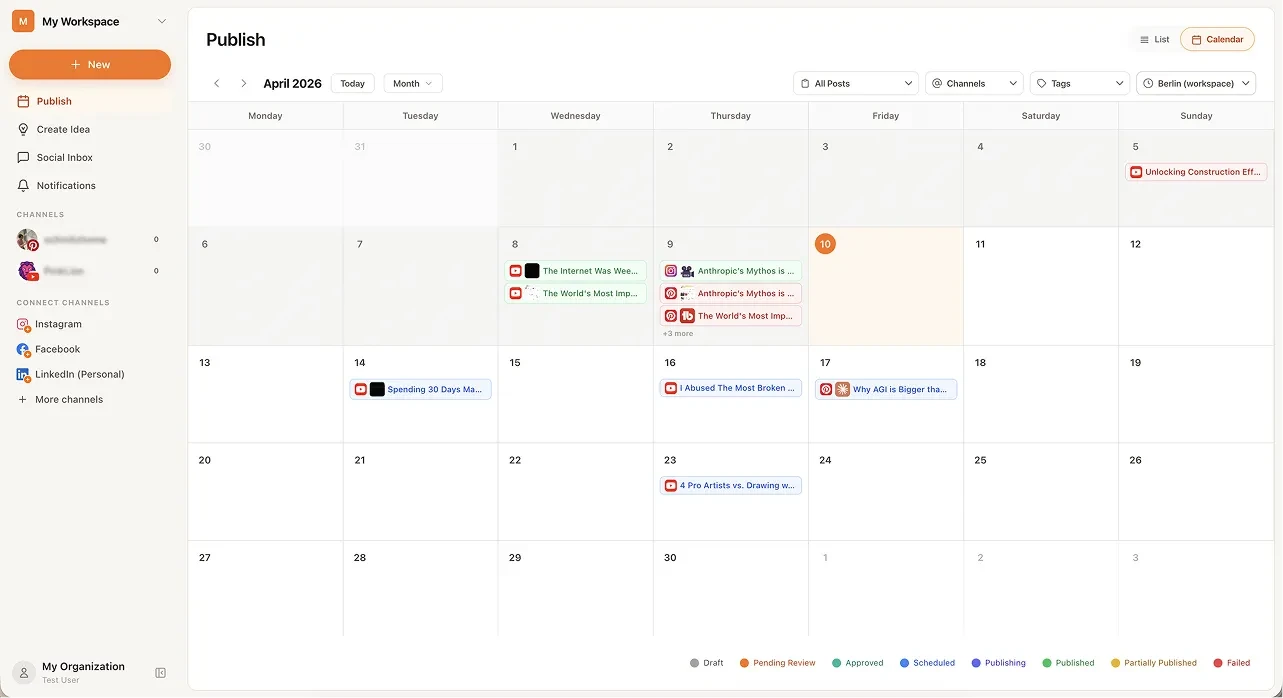 From the maker

BrightBean Studio
A self-hostable social publishing workspace with a calendar, platform-specific drafts and approval steps.
Claude Code · CodexBrightBean Studio vs Taplio
Self-hosted drafts and publishing setup; platform credentials, format support and permissions still need configuration.
Read moreHow vibeforthat Reviews Sources
Understand the difference between a discovery lead, a maker build record and an independently tested product.
Read more