
ALTERNATIVES
Adobe Photoshop Alternatives for Layered Image Editing
Compare Adobe Photoshop alternatives for layered Image Editing. Check editable layers, typography and handoff formats.
On this page
The short version
| Option | Task to compare | Check separately |
|---|---|---|
| PhotoCraft · AI-assisted alpha | Layers, adjustments, masks and live type | Representative PSD round trip and alpha gaps |
| GIMP · established software | Native image manipulation and compositing | Working format and downstream document exchange |
| Photopea · established software | Layered editing in the browser | Actual fonts, effects and browser limits |
An AI-built option
1 projectEstablished options to compare

GIMP
A mature cross-platform image editor for retouching, compositing and graphic elements.
Consider a native image-editing workflow; check the document exchange with other editors.
Visit official site
Photopea
A browser image editor with layers, masks and documented PSD opening and saving.
Useful for a browser-based layered-document route; test your actual fonts and effects.
Visit official site PhotoCraftAdobe Photoshop
Check one representative handoff
01Check appearance and editability separately.
02Use the fonts and effects in your actual handoff.
03Keep the original layered document.
Try one workflow before switching
Open one layered file with live text and a mask. Make a small change, save a copy and ask the next editor to reopen it. Record any flattened layers or font substitutions.
Start with the document someone needs next
A flattened picture, a layered PSD and an editable campaign graphic are different deliverables. Write down who opens the result and what they must change. Photopea documents PSD opening and saving; GIMP offers a mature native image-editing route. PhotoCraft documents layers, masks and type, but its early-alpha status makes a representative document check part of the decision.
Check live text as well as the finished pixels
Use a small design with one title, a mask and an adjustment layer. The official PhotoCraft screenshot shows text being edited over a landscape, which establishes what the publisher demonstrates. It does not tell you whether your font, line breaks or downstream application will behave the same way. Inspect the editable text and the exported appearance as separate results.
Reopen one copy before moving the whole library
Keep the original file. Open a copy, make a small edit, save it and reopen it in the application that receives the work. Compare masks, text and the adjustments the next editor needs. PhotoCraft’s published PSD test corpus is useful source material, but its reported results are not a compatibility measurement for your files. This review did not perform that round trip.
A photo library may need a different tool
When the main task is developing and organizing camera files, compare a photo-library workflow rather than only layer editing. LightCraft, darktable and RawTherapee address that adjacent job. For a composite or graphic, keep the working document, a correctly sized output and the needed fonts or source assets together. That makes a handoff easier to check.
How to use this comparison
Run the same small workflow in your shortlisted products: keep the input, output and required integration the same. The table records documented scope; it does not report a side-by-side product test.
A few more details
Does PSD support mean complete Photoshop compatibility?
Check the features used in your document and the next editing step. Opening, appearance, editability and saving are separate checks; no universal parity is established here.
Are all of these apps AI-built?
Only entries with an original maker record carry that attribution. Established products are listed separately and are not assigned an AI-build label.
Sources & maker notes
The AI-build attribution applies only to products with a linked maker record. Other options use the publisher’s current product documentation; prices and plans should be checked at the source.
Related guides & projects
View all
Adobe Lightroom Alternatives for RAW Editing and Photo Libraries
Compare Adobe Lightroom alternatives for RAW Editing and Photo Libraries. Check camera compatibility, library organization and edit handoff.
Read moreSoftware Alternatives by Product
Start with a product you use and compare replacement workflows, supported tasks and what you would need to migrate.
Read moreDesign and Content App Examples
Choose a focused tool for visual assets, recording, editing or publishing.
Read more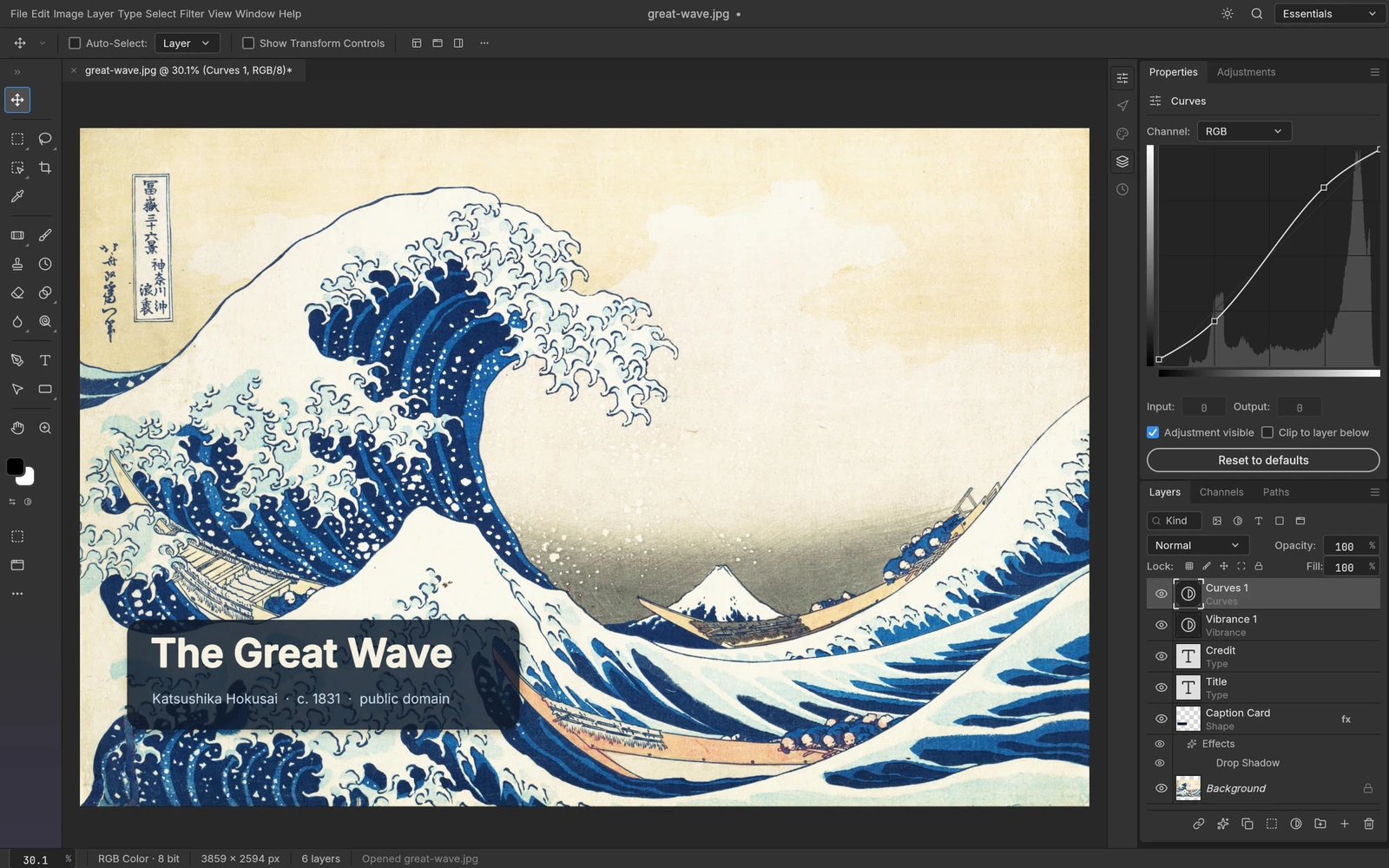 From the maker
PhotoCraft
An early-stage layered image editor with masks, editable type, adjustments and documented PSD read/write support.
ClaudePhotoCraft vs Adobe Photoshop
Compare a layered image handoff: live text, masks, document appearance and reopening the saved result.
Read moreHow vibeforthat Reviews Sources
Understand the difference between a discovery lead, a maker build record and an independently tested product.
Read more